Shopify Ecommerce Tracking: From Missing Data to Verified Measurement
QMR Fashion needed reliable ecommerce measurement before investing in paid advertising. I built a tracking setup connecting Shopify, Google Tag Manager, GA4, Google Ads, and Meta—then validated the key events and reporting signals.

Imran Ahmed
Google Ads & Conversion Tracking Specialist
Primary Purchase goal active with dynamic values & transaction ID passing.
Item arrays validated end-to-end in GA4 DebugView across checkout.
Browser Pixel + Cloud Server GTM container routing duplicate-safe payloads.
Matching event IDs verified in Meta Events Manager with zero double-counting.
Active
Dynamic values & Enhanced Conversions verified
Validated
Item parameters mapped in DebugView
Dual-Tracked
Browser Pixel + Server Container routing
1:1 Match
event_id sync verified in Events Manager
Client Background & Measurement Need
QMR Fashion is an ecommerce apparel brand running on Shopify. Before scaling paid advertising campaigns across Google Ads and Meta, the business needed reliable tracking to evaluate return on ad spend (ROAS) and provide accurate conversion signals to automated bidding strategies. Without verified purchase values and event tracking, campaign optimization would rely on incomplete data.
Prior to launching Google Shopping and Meta customer acquisition campaigns, the store required a dependable conversion infrastructure. Without verified purchase values and event confirmation, automated bidding algorithms (Target ROAS and Value Optimization) would optimize on incomplete data, risking misallocated ad spend.
Project Scope Profile
Tracking Gaps Before Implementation
An initial audit of the Shopify storefront identified three specific obstacles preventing reliable campaign measurement.
Missing Dynamic Conversion Values
Shopify checkout transitions frequently dropped key transaction parameters (transaction_id, value, currency). In Google Ads, campaigns could not optimize for revenue, forcing bidding strategies to treat every conversion identically regardless of cart value.
Incomplete Browser-Only Visibility
Relying exclusively on client-side browser pixels left measurement vulnerable to content blockers, strict browser cookie lifecycles (such as Safari ITP), and script loading delays before confirmation pages finished rendering.
Unvalidated Signals & Duplicate Event Risk
Disconnected tracking scripts and legacy app tags fired simultaneously without coordinated event identifiers. In Meta Events Manager, this created a risk of double-counting purchase events, artificially inflating performance reports.
How the Tracking Architecture Was Built
The tracking setup was deployed in five sequential phases, verifying data validity at each step before enabling live advertising tags.
Shopify Data Layer & GTM Event Architecture
Deployed a clean, structured data layer on the Shopify storefront (covering catalog views, cart interactions, checkout steps, and order confirmation). Standardized the data format so every downstream tag received consistent item arrays, cart values, and unique order IDs rather than scraping unpredictable DOM elements.
GA4 Ecommerce & Google Ads Conversion Configuration
Configured GA4 recommended ecommerce tags (view_item_list, add_to_cart, begin_checkout, purchase) with granular item arrays. Configured Google Ads Primary conversion actions with dynamic revenue and transaction ID passing to feed Smart Bidding accurate signals.
Google Ads Enhanced Conversions Integration
Implemented user-provided data variables in GTM to safely hash first-party customer signals (email and phone number via SHA-256) upon purchase completion, improving conversion attribution match rates within Google Ads.
Meta Conversions API & Event Deduplication Routing
Deployed a Google Cloud Server GTM container for Meta's Conversions API. Generated deterministic event_id keys attached simultaneously to both browser Pixel and server-side payloads, enabling Meta to match identical events and discard duplicates.
Diagnostics, Multi-Tool Verification & Handover
Validated end-to-end event execution across GTM Preview mode, GA4 DebugView, and Meta Events Manager Test Events. Documented container architecture and parameter schemas for the client's internal team.
Before vs After Setup Comparison
Direct comparison of tracking capabilities before implementation versus the verified state ready for campaign launch.
Before: Initial Store State
- Google Ads Purchase TrackingMissing Dynamic Values / Unverified
- GA4 Ecommerce FunnelIncomplete Events Across Checkout
- Meta Advertising SignalsBrowser-Only Pixel Without Server Delivery
- Purchase DeduplicationUncoordinated Tags (Duplicate Event Risk)
- Data Layer SchemaFragmented Script Snippets Without Standard Schema
After: Verified Infrastructure
- Google Ads Purchase TrackingConfigured & Tested with Real-Time Values
- GA4 Ecommerce FunnelFull-Funnel Events Validated in DebugView
- Meta Advertising SignalsDual Browser + Server CAPI Pipeline Active
- Purchase DeduplicationSynchronized event_id Matching 1:1
- Data Layer SchemaStructured Ecommerce Arrays Aligned with GA4
Configuration & Diagnostics Evidence
Actual setup records across Google Tag Manager, Meta Events Manager, Google Ads Conversion Actions, and GA4 DebugView. Click any image to view full-resolution diagnostics.
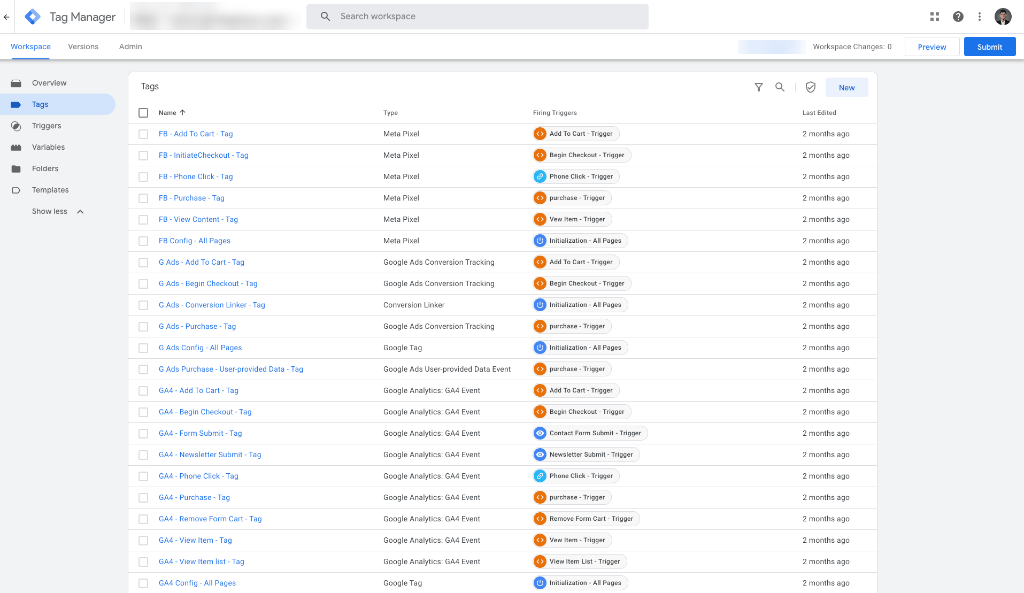
Evidence:Shows the complete tag configuration in Google Tag Manager, including tags for GA4 Configuration, GA4 Ecommerce Events, Google Ads Conversion Tracking, and Meta Pixel / CAPI event triggers.
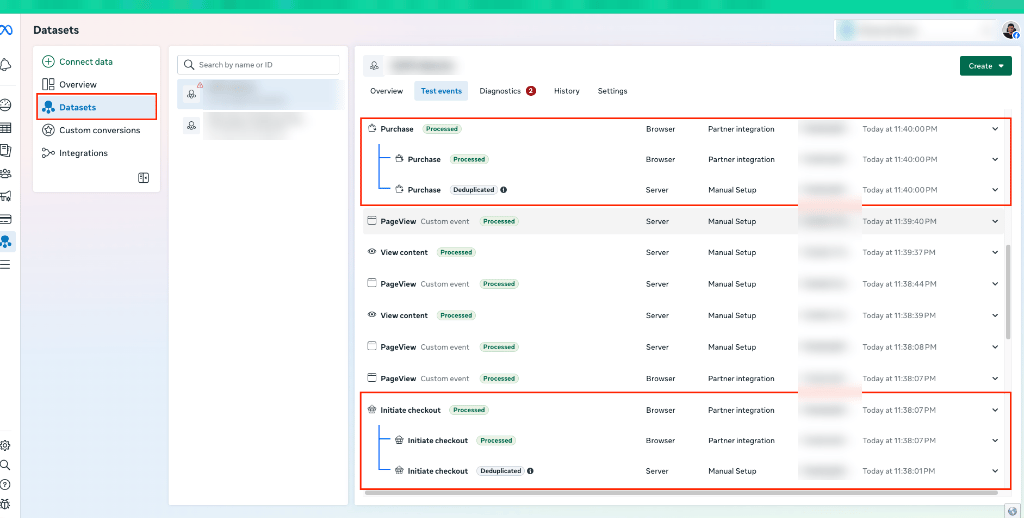
Shows Meta Events Manager receiving both Browser and Server (Manual Setup) signals for the Purchase event, successfully deduplicated via matching event_id keys.
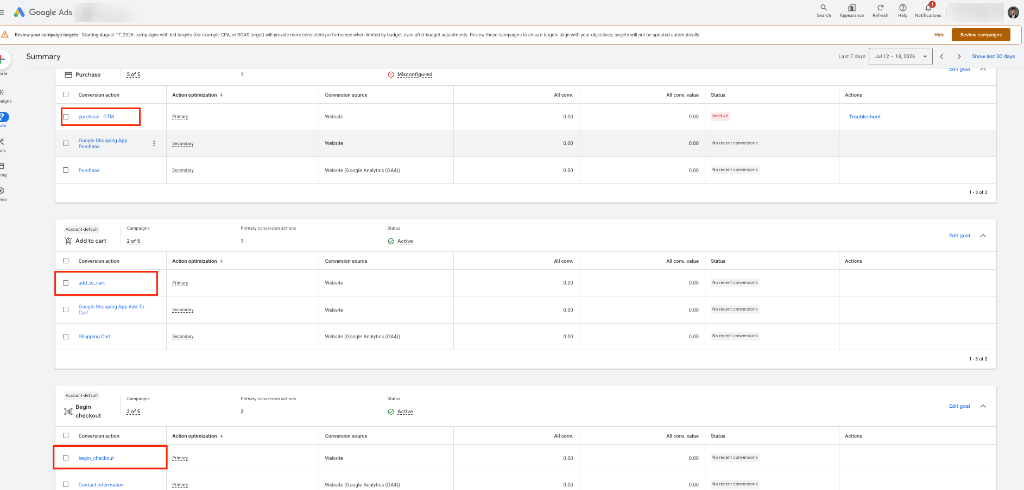
Shows primary conversion actions (Purchase, Begin Checkout, Add to Cart) configured, active, and receiving tracking signals with dynamic transaction values.
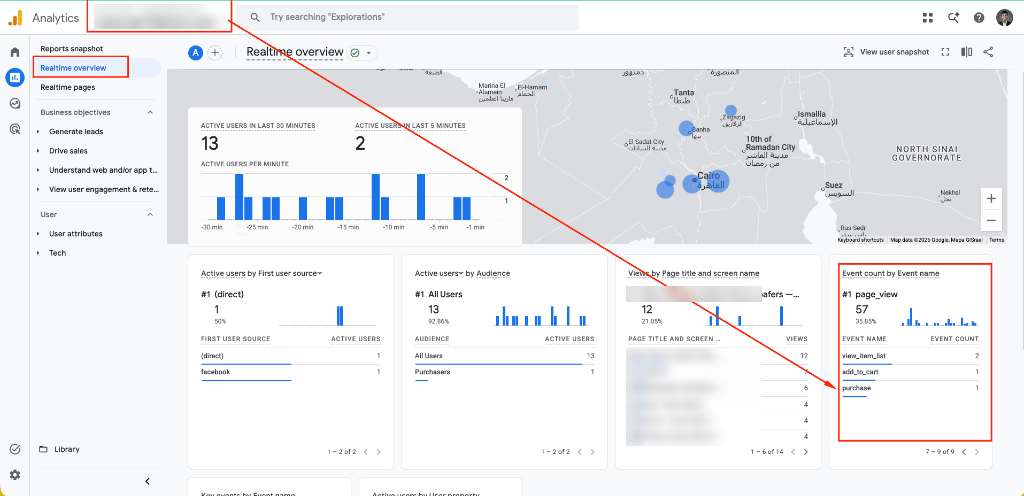
Shows the realtime event stream in Google Analytics 4 capturing View Item List, Add to Cart, and Purchase events during testing.
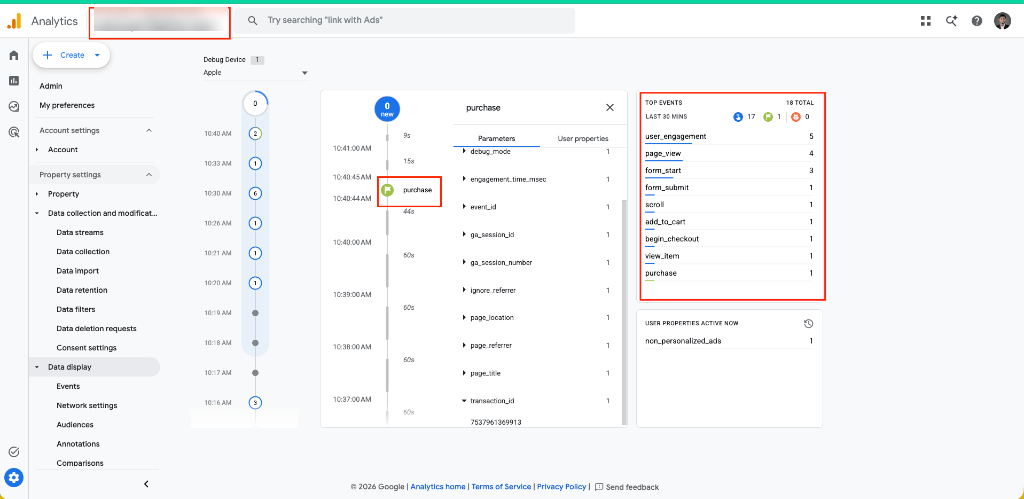
Shows GA4 DebugView validating required ecommerce event parameters (transaction_id, value, currency, and items array) on the Purchase event.
Need Reliable Tracking for Your Store?
Tell me about your Shopify store and current tracking setup. We can identify what needs attention and discuss a practical next step.
30-minute introductory call · No obligation · Direct technical guidance